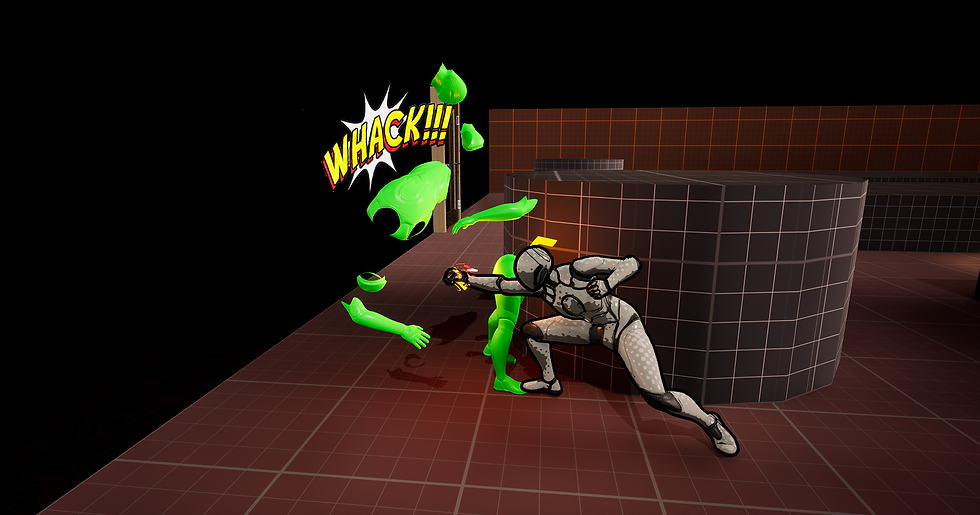
After Hours: Mannequin Mayhem is an isometric beat-em-up inspired by the combat of Hades. You are a mannequin, tasked with clearing out every store of enemies.
This game was an opportunity to delve into combat design. I got the chance to develop a full moveset for the player character; including a light attack, charge attack, and dash. Additionally, I established our level design metrics, and used those metrics in creating the “Hot Topic” arena.
Accomplishments
Designed a Hades-like combat system in collaboration with other designers.
Designed the “Hot Topic” themed arena.
Established level design metrics for the team.
Scripted an enemy wave system.
Implemented the light attack and charge attack using Unreal’s Gameplay Ability System.
Implemented polish elements, such as the enemy wave UI.
Created the “Exploding Roomba” enemy
About
Team Project (5 People)
January 2026-April 2026
Made in Unreal Engine 5
Combat Design & Game Feel
Movement
Mannequin Mayhem is directly inspired by Hades, so one of the first things I did for this project was analyze the game feel of Hades and replicate it in this game.
I noticed the movement in Hades was very responsive, with minimal buildup and windup between being still and moving at full speed. You could also turn very rapidly in Hades. In fact, it instantly snaps you to a direction. To achieve this feeling, I modified our player character’s Character Movement Component. I gave our character a more responsive and quick feeling, which helped our game feel more like Hades.
Attacks
To separate ourselves from Hades, we decided our combat system would focus on close ranged attacks. The player character has two attacks: a light punch and a charge attack. Both attacks went through multiple iterations.
Light Attack
It was a challenge to strike a balance for the light attack. In the beginning, it felt very unresponsive. A problem was with the animation. The windup took too long, causing too much time to pass between pressing the input and the attack landing. The animation also was not readable when the camera was too far away.
To fix these issues, I replaced the animation with a more extreme and dynamic one. I trimmed that animation and took out all animation blending. The animation now begins at the apex of the punch, without any windup. Finally, I had a VFX artist implement a trail on the fist.

Charge Attack
The charge attack was initially a static punch that got more powerful the more it was charged. The player could move slowly while charging it, but was stopped when releasing it. Playtesting revealed that it was too slow and risky, so players had no reason to use it over the light attack.
To differentiate it from the light attack, I took inspiration from the spin attack from The Legend of Zelda series. The charge attack would now hit multiple times and the player could move when releasing it. Its duration is increased the longer you charge it. This new iteration gave it mobility and power expression, while still maintaining the risk of charging the attack.
Level Design
When our combat system was established, I went on to develop arenas that would allow players to express the system in interesting ways.
Level Design Metrics
My first task was to establish metrics that our game would use. I created a Level Design Metrics level, where I established the size of rooms, corridors, walls, and doorways. Here’s how I established and justified each metric:
Room size: I ran around the area, timing how long it takes to get from point to point. I then added enemies into the space, and got a feel for how crowded the room could get.
Corridors: I made sure that enemies could surround the player, but players could always escape.
Walls: I made sure interior walls never fully covered the player, while exterior walls would never block out the background.


“Hot Topic” Level

My design goals for this level were to have a crowded and small space, but always give the player a clear escape path around enemies. I find Hot Topic stores in real life to feel crowded, so I wanted to convey this feeling in my level. I started by replicating the layout of an actual Hot Topic store, which features an isle through the middle and two parallel paths. These paths would allow players to funnel enemies into a confined space, and then unleash a devastating attack on all of them.
After establishing the basic layout, I translated it into a level design map. I then used my metrics to outline the exact spacing between objects. I then blocked out the level in Unreal.


Finally, I added some visual touches. I recreated the unique Hot Topic lighting using a Skylight with a Cubemap. I gave the level dark lighting with harsh, warm spotlights. Finally, I added a scrolling texture to the background. I made a custom gothic texture featuring skulls and roses. This final touch did a lot to give it a punk, emo feeling.

Enemy Wave System
A massive scripting task I had in this project was creating the Enemy Wave System. The team wanted precise control over the order that enemies spawn in. Each level should have a different array of enemies, and designers should be able to place spawn points.
The wave system consists of two blueprints: enemy spawn points and an enemy spawner. The spawner did the work of organizing enemy waves, dispatching events to other actors, and giving the final reward when all enemies are cleared. The spawn points would receive information from the spawner, and simply spawn enemies.
The spawner takes a datatable, where each row represents a wave. This allows designers to precisely choose which order enemies appear in. The data table is exposed as a variable, so each level could refer to a different data table and thus have different enemies.


Enemy Spawner - Blueprint Breakdown
The enemy spawner first takes a given data table row (representing a wave), and converts it to an array. This array is then broken into “batches.” The size of batches depends on how many spawn points are in the level.
When all batches have been spawned, the game will wait until all enemies have been killed. When they have, the game will spawn the next wave. If there are no more waves, the game will spawn a reward and send out an event dispatcher to notify relevant actors that the room has cleared.
Finally, I hooked up the enemy spawner to a UI element, which shows the number of waves and enemies in a room. This polish effect did a lot to give each encounter a sense of progression and style.